APK Download Pakistan: Your Complete Safety Guide
Regional restrictions shouldn't limit your access to apps. Whether it's payment platforms, entertainment services, or gaming apps, learn how Pakistani Android users safely download and install APK files in 2026.
What is APK Download and Why Do Pakistani Users Need It?
APK stands for Android Package Kit—the file format Android uses to distribute and install applications. Normally, you download apps through Google Play Store, which handles everything automatically. But what happens when the app you need isn't available in Pakistan's Play Store?
That's where APK download comes in. Instead of relying on Google's regional restrictions, you download the raw APK file directly from trusted sources and install it manually. It's like downloading software for your computer—just on Android.
Why Pakistani Users Turn to APK Downloads
- Payment apps blocked: Skrill, Neteller, and some international payment gateways don't appear in Pakistan's Play Store despite being legal and functional.
- Entertainment platforms restricted: Streaming services, sports apps, and content platforms often launch region-by-region. Pakistan sometimes waits months or years for official availability.
- Gaming apps geo-locked: Popular games and their companion apps face regional restrictions due to licensing or publisher decisions.
- App updates delayed: Even when apps are available, Pakistani users sometimes get update rollouts weeks later. APK downloads let you update immediately.
- Beta testing access: Want to try new features before official release? APK files let you install beta versions.
The bottom line: APK download isn't about piracy or breaking rules. It's about accessing legitimate apps that should be available but aren't—due to bureaucratic delays, licensing complications, or corporate oversight.
Safe APK Download Sources for Pakistan
Not all APK sources are created equal. Download from the wrong site and you risk malware, stolen data, or bricked phones. Stick to these trusted sources used by millions of Pakistani Android users.
✓ Verified APK Repository (Mirror Platform)
Safety level: Highest
What it offers: Verified APKs uploaded directly by developers. Every file cryptographically signed and checked for tampering.
Popular downloads: Payment apps (Skrill, Neteller, Payoneer), entertainment platforms, productivity tools
Pakistan accessibility: Website fully accessible. No VPN required.
Why trust it: Owned by reputable tech publishers. Strict verification process. Used by developers worldwide.
✓ Large APK Repository (Alternative Store)
Safety level: High
What it offers: Large library of apps, including region-locked titles. Built-in app store alternative to Google Play.
Popular downloads: Gaming apps, international entertainment platforms, VPN services
Pakistan accessibility: Fully functional. Offers its own app store client.
Why trust it: Established in 2014. Scans all APKs for malware. Transparent about app sources.
✓ Official Developer Websites
Safety level: Highest (when legitimate)
What it offers: Direct downloads from companies' official sites. Payment apps like Neteller sometimes offer APK downloads on their Pakistani support pages.
Popular downloads: Financial apps, enterprise software, beta versions
Pakistan accessibility: Varies by company. Some use geo-detection.
Why trust it: Coming straight from the source = zero tampering risk. Always check you're on the real domain (not a lookalike).
✓ Open-Source Repository
Safety level: Highest
What it offers: Open-source apps only. Every app built from source code and verified. No trackers, no proprietary code.
Popular downloads: Privacy-focused apps, open-source tools, security utilities
Pakistan accessibility: Fully accessible.
Why trust it: Community-driven. Transparent build process. Perfect for security-conscious users.
⚠️ AVOID These APK Sources:
- Random Google search results: Sites promising "free premium apps" = malware magnets
- Social media file shares: WhatsApp/Telegram APK files from unknown senders
- Torrent sites: Modified APKs with hidden malware
- Sites requiring registration: Legitimate sources don't make you sign up first
How to Install APK Files on Android (Step-by-Step)
Never installed an APK before? It's simpler than you think. Here's the complete process for Pakistani Android users:
Step 1: Enable "Install Unknown Apps"
Android blocks APK installs by default (for security). You need to allow installation from your browser or file manager:
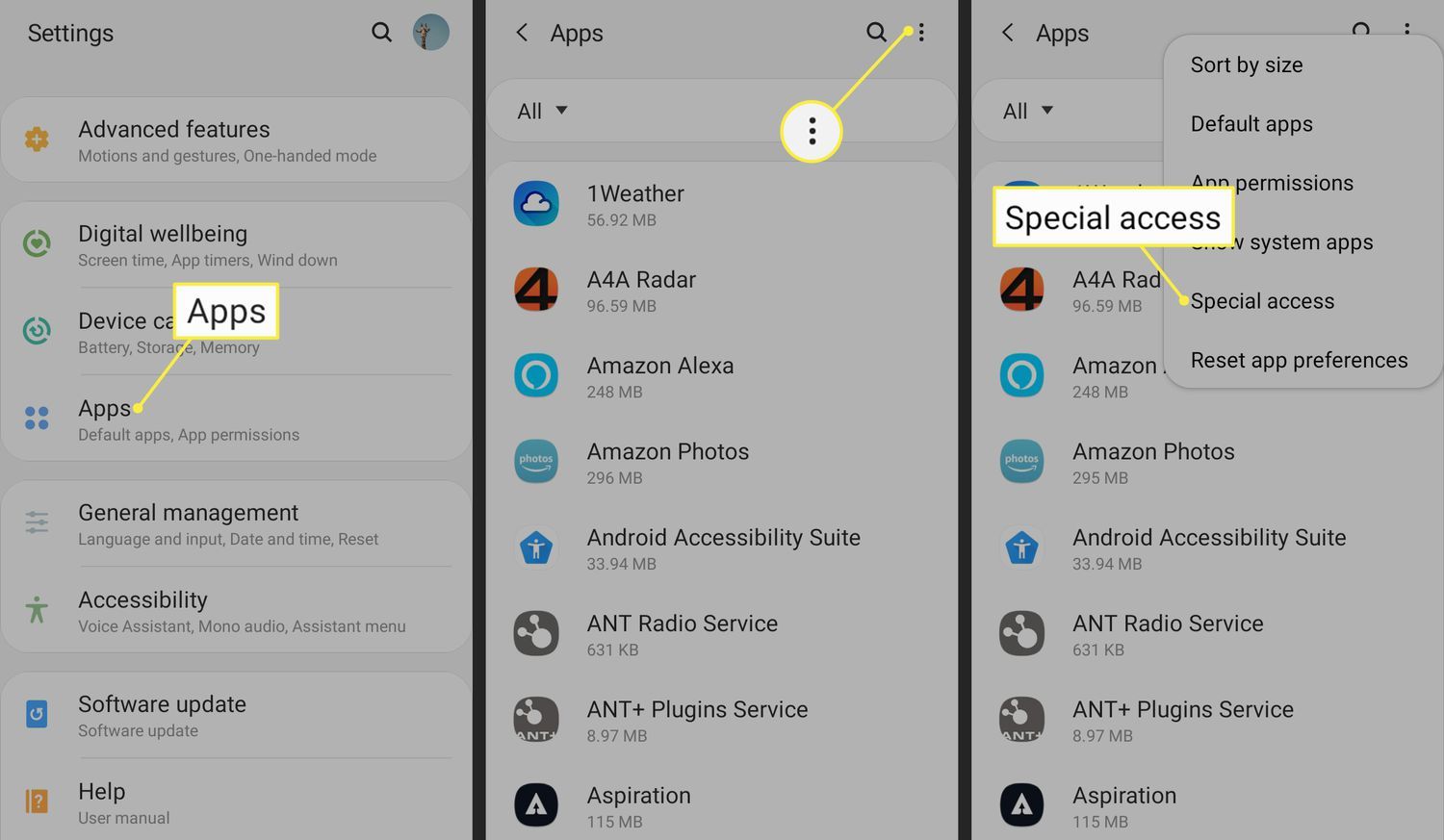
- Open Settings on your Android phone
- Navigate to Apps & notifications (or "Apps")
- Tap Advanced → Special app access
- Select Install unknown apps
- Choose your browser (Chrome, Firefox) or file manager
- Toggle "Allow from this source" ON
Note: You'll only need to do this once per app (browser, file manager). Android asks for permission each time you install an APK.
Step 2: Download the APK File
- Visit a trusted source (verified repositories, official developer sites)
- Search for your desired app (e.g., "Neteller APK Pakistan")
- Check the version number matches the latest official release
- Tap Download APK
- Wait for download to complete (files usually 10-50 MB)
Tip: Downloads go to your "Downloads" folder by default. File managers like Files by Google make them easy to find.
Step 3: Install the APK
- Open your Downloads folder (or notification tray)
- Tap the downloaded APK file
- Android shows an installation prompt
- Review the permissions the app requests
- Tap Install
- Wait 5-15 seconds for installation to complete
- Tap Open or find the app in your app drawer
Step 4: First Launch & Setup
- Open the newly installed app
- Complete initial setup (account login, permissions)
- For payment apps: Link your Pakistani bank card or account
- Enable security features (biometric login, PIN code)
For entertainment or gaming apps: Some require additional data downloads on first launch. Connect to WiFi to save mobile data.
Security Checklist: Verify APK Safety Before Installing
Even when downloading from trusted sources, smart Pakistani users double-check. Here's how:
1. Check the File Size
Compare the APK file size with Google Play Store listings (use a VPN to check international Play Stores if needed). Massive discrepancies = red flag.
Example: Skrill app is ~25 MB. Downloaded APK shows 80 MB? Don't install—it's been modified.
2. Verify the Package Name
Every Android app has a unique package name (like com.skrill.moneybookers). Before installing, check if the APK's package matches the official one.
How: Use APK analyzer apps (available on Play Store) or check verified repository listings—they show package names clearly.
3. Review Permissions Carefully
Payment apps need access to: Storage (for caching), Network (for transactions), possibly Phone (for 2FA SMS). They DON'T need: Camera (unless for QR scanning), Contacts, Call logs.
Red flag: Gaming app asking for SMS permissions? Entertainment app wanting call logs? Skip it.
4. Use Online Virus Scanning
Upload the APK file to online virus scanning services before installing. These services scan using 70+ antivirus engines. Zero detections = safe. Multiple detections = malware.
Pakistan tip: Most scanning services work from Pakistan without VPN. Upload directly from your phone's browser.
5. Check Developer Signature
Legitimate apps are digitally signed by their developers. Verified repositories check signatures automatically. If downloading elsewhere, use verification tools to ensure signatures match official releases.
Popular APK Downloads Among Pakistani Users
Payment & Financial Apps
Why APK download needed: International payment gateways often face Play Store restrictions in Pakistan.
- Skrill (Moneybookers): For international payments, online entertainment platform deposits, freelance income
- Neteller: Sister service to Skrill, popular for gaming and sports streaming subscriptions
- Payoneer: Receive international payments, withdraw to Pakistani banks
- PayPal (limited): Viewing statements and managing existing accounts (new account creation restricted)
Entertainment & Streaming Apps
Why APK download needed: Content licensing issues cause regional unavailability.
- International streaming platforms not yet launched in Pakistan
- Sports streaming apps for cricket, football, other live events
- Music and podcast apps with global libraries
- E-book and audiobook platforms
Gaming Apps & Companions
Why APK download needed: Publishers sometimes skip Pakistani Play Store releases.
- Game launchers and updaters
- Companion apps for PC/console games
- Gaming community and voice chat apps
- In-game currency and rewards apps
VPN & Privacy Tools
Why APK download needed: Government policies or corporate blocks affect availability.
- VPN apps for accessing geo-restricted content
- Privacy-focused browsers and messaging apps
- Ad-blocking and security utilities
Keeping APK-Installed Apps Updated
Apps installed via APK don't auto-update through Google Play. You need to manually update them. Here's how Pakistani users handle it:
Method 1: Manual APK Updates
Revisit your trusted source (verified repositories, official sites) every few weeks. Download the latest version. Install over the old one (Android preserves your data and settings).
Method 2: Alternative App Store Clients
Some repositories offer their own app store clients that notify you when updates are available. Install the client once, and it handles updates for all your sideloaded apps.
Method 3: Developer Notifications
Some apps (especially financial ones like Neteller) notify you of updates within the app itself. Follow in-app prompts to download the latest APK.
Security tip: Always update payment and financial apps immediately when new versions release. Updates often include critical security patches.
Troubleshooting Common APK Download Issues in Pakistan
Problem: "App not installed" error
Causes & solutions:
- Incompatible Android version: Check if the app requires newer Android than your phone has
- Corrupted download: Delete and re-download the APK
- Conflicting package: Uninstall the old version completely before installing new APK
- Insufficient storage: Free up at least 100-200 MB before installing
Problem: App crashes on launch
Solutions:
- Clear app cache (Settings → Apps → [App name] → Storage → Clear cache)
- Ensure your Android version is compatible
- Check if the app requires Google Play Services (install from Play Store)
- Try downloading from a different trusted source
Problem: Payment app won't connect to Pakistani bank
Solutions:
- Verify you're using the correct app version for Pakistan
- Check if your bank card supports international online transactions (call your bank)
- Enable 3D Secure/OTP verification on your card
- Some payment apps require VPN during setup (use sparingly and securely)
Is APK Download Legal in Pakistan?
Yes, APK downloads are 100% legal in Pakistan. You're simply installing software manually instead of through an app store. No law prohibits this.
What IS illegal: Pirating paid apps (downloading "cracked" versions of apps that cost money), distributing copyrighted content, or using apps to commit fraud.
Downloading legitimate free apps (like payment gateways, entertainment platforms, or utility tools) via APK is perfectly legal—even if they're not on Pakistan's Play Store.
Bottom line for Pakistani users: Stick to trusted sources, avoid pirated apps, and you're operating within the law. APK download is a legitimate workaround for regional restrictions—not a hack or exploit.
Access the Apps You Need
Regional restrictions shouldn't limit Pakistani users. From payment gateways to entertainment platforms, APK downloads open doors to the full Android ecosystem.